Mission Briefing
By the end of this mission, you will be able to:
Explain what a servo motor is and how it differs from other motors
Describe how a servo uses a signal to determine its angle
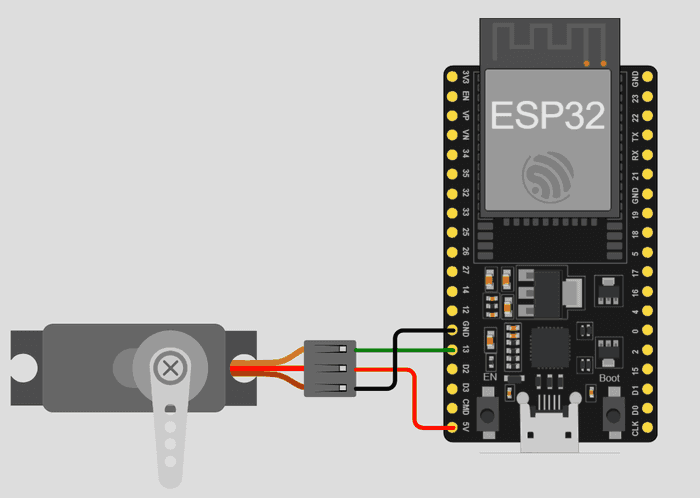
Wire a servo motor to the ESP32 correctly
Move a servo between two angles using code
Let's Get Started
Robot arms, camera gimbals, and RC car steering all point precisely thanks to one component: the servo motor. In this lesson, you'll wire one up and move it to exact angles using nothing but code.
Robo says: “A servo doesn't just spin — it points. Give it an angle, and it goes there and holds still. Let's wire one up.”
What Is A Servo Motor?
A servo motor moves to and holds a specific angle — typically between 0° and 180° — instead of spinning continuously like a regular motor.
How A Servo Reads Angle
Internally, a servo reads a signal on its signal wire, and the width of that signal tells it exactly which angle to move to. The Servo.h library handles generating this signal for you: myServo.attach(13) tells your code which pin the servo's signal wire is connected to, and myServo.write(angle) sets the target angle.
Power
Servos often need more current than the ESP32's onboard pins can reliably supply, especially under load. An external 5V power supply is recommended to avoid brownouts or unexpected resets.
Equipment
- ESP32
- 1 Servo motor (e.g., SG90)
- External 5V power supply (recommended)
- Jumper wires
Activity
Move the servo between 0° and 90°.
Code
#include <Servo.h>
Servo myServo;
void setup() {
myServo.attach(13); // signal pin
}
void loop() {
myServo.write(0);
delay(1000);
myServo.write(90);
delay(1000);
}
Did You Know?
- • The tiny SG90 servo commonly used in these lessons can rotate to any angle between roughly 0° and 180°, but can't spin all the way around like a wheel motor.
- • Using an external power supply for servos is one of the most common fixes for “flaky” or resetting projects.
🔧 Try It Yourself
Try writing a few different angle values and watch how the servo moves, then write down what you tried:
Example: myServo.write(45) moved the servo about a quarter of the way through its range.
• A small angle (like 20)
• A middle angle (like 90)
• A large angle (like 170)
#include <Servo.h>
Servo myServo;
void setup() {
myServo.attach(13); // signal pin
}
void loop() {
myServo.write(0);
delay(1000);
myServo.write(90);
delay(1000);
}
Think About It
🤔 Discuss With a Partner or Write Your Answer
Why do you think a servo needs both a signal wire AND a separate power connection, instead of getting everything from one wire like an LED does?
Quick Recap: Fill In The Blanks
1. A servo motor moves to and holds a specific ________ instead of spinning continuously.
2. The ________() function tells the code which pin the servo's signal wire is connected to.
3. The ________() function sets the angle a servo should move to.
4. Servos often need an external ________ supply because they can draw more current than the ESP32 alone can provide.
Match It!
Draw a line (or write the matching letter in the blank) to connect each word to its meaning.
Check Your Understanding
I can explain what a servo motor is and how it differs from other motors
I can describe how a servo uses a signal to determine its angle
I can wire a servo motor to the ESP32 correctly
I can move a servo between two angles using code
Quiz Time!
Question 1: What does a servo motor do that a regular motor doesn't?
🔍 Reveal answer (drag-select the blank space): B
Question 2: What does myServo.write(90) do?
🔍 Reveal answer (drag-select the blank space): B
Question 3: Why is external power often recommended for servo projects?
🔍 Reveal answer (drag-select the blank space): B
Challenge Zone
🏆 Level Up
Can you make the servo move to three different angles, pausing at each one?
Robot Journal
Name one real device that uses a servo motor (think robot arms, RC cars, or camera equipment), and explain what job it does.
Lesson Wrap-up
🤖 Robo Says
Your servo just made its first move! Next up: Lesson 2 — you'll turn that instant jump into smooth, sweeping motion.
Wiring Diagram