Mission Briefing
By the end of this mission, you will be able to:
Explain how a Time-of-Flight (ToF) sensor measures distance
Describe what I2C communication is and why this sensor uses it
Wire the VL53L0X sensor to the ESP32 correctly
Read and display distance measurements in the Serial Monitor
Let's Get Started
Face ID on phones, self-driving cars, and automatic doors all rely on precise distance sensing. In this lesson, you'll meet the VL53L0X — a sensor that measures distance using nothing but light.
Robo says: “This sensor doesn't guess distance — it uses actual light to measure it, down to the millimeter. Let's find out how.”
What Is A Time-of-flight Sensor?
The VL53L0X sends out a tiny pulse of laser light and measures exactly how long it takes to bounce back — that's called Time of Flight. Since light travels at a known, constant speed, that tiny time delay tells the sensor exactly how far away an object is, down to the millimeter.
I2C Communication
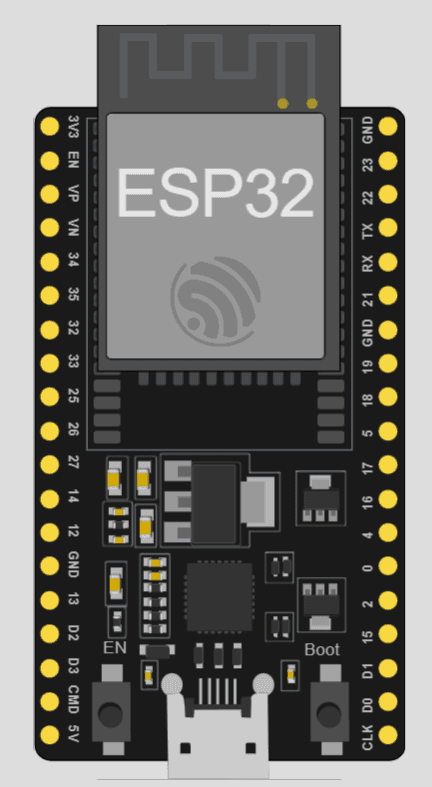
Unlike sensors you've used before that use one dedicated wire (like the PIR's OUT pin or the DHT's DATA pin), the VL53L0X communicates using I2C, a two-wire protocol: SDA (data) and SCL (clock). I2C lets multiple sensors share just two wires connected to the ESP32, which is why this sensor uses GPIO 21 (SDA) and GPIO 22 (SCL) specifically, instead of just any pin.
Wiring
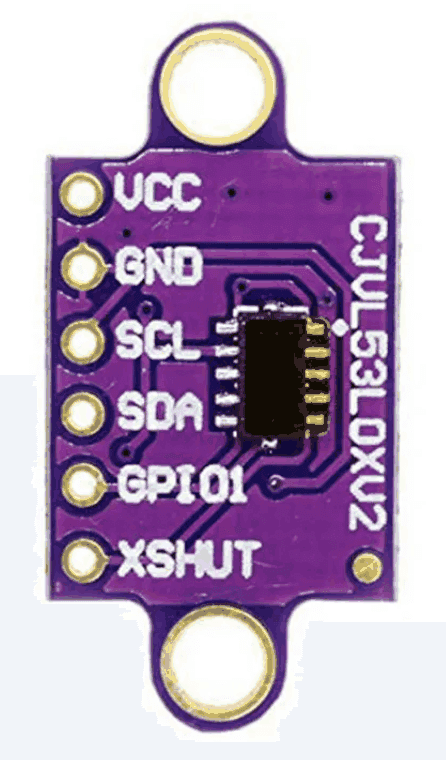
This lesson's circuit connects the VL53L0X like this:
VIN → 3.3V
GND → GND
SDA → GPIO 21
SCL → GPIO 22
Equipment
- ESP32
- VL53L0X sensor module
- Breadboard + jumper wires
Circuit Diagram
VL53L0X pin reference
Activity
Display distance readings in the Serial Monitor.
Code
#include <Wire.h>
#include <Adafruit_VL53L0X.h>
Adafruit_VL53L0X lox = Adafruit_VL53L0X();
void setup() {
Serial.begin(115200);
Wire.begin();
if (!lox.begin()) {
Serial.println("Failed to find VL53L0X sensor");
while (1);
}
}
void loop() {
VL53L0X_RangingMeasurementData_t measure;
lox.rangingTest(&measure, false);
if (measure.RangeStatus != 4) {
Serial.print("Distance (mm): ");
Serial.println(measure.RangeMilliMeter);
} else {
Serial.println("Out of range");
}
delay(500);
}
Did You Know?
- • This exact Time-of-Flight technology is used in phone Face ID and LiDAR camera systems, and in self-driving cars to detect obstacles.
- • Because light travels so fast, the VL53L0X can measure distances up to about 2 meters with millimeter precision, all within a fraction of a second.
🔧 Try It Yourself
Hold your hand at a few different distances from the sensor and record what the Serial Monitor shows:
Example: About 10cm away — Distance (mm): 102
• Very close (a few cm)
• About arm's length
• As far as you can while still in range
#include <Wire.h>
#include <Adafruit_VL53L0X.h>
Adafruit_VL53L0X lox = Adafruit_VL53L0X();
void setup() {
Serial.begin(115200);
Wire.begin();
if (!lox.begin()) {
Serial.println("Failed to find VL53L0X sensor");
while (1);
}
}
void loop() {
VL53L0X_RangingMeasurementData_t measure;
lox.rangingTest(&measure, false);
if (measure.RangeStatus != 4) {
Serial.print("Distance (mm): ");
Serial.println(measure.RangeMilliMeter);
} else {
Serial.println("Out of range");
}
delay(500);
}
Think About It
🤔 Discuss With a Partner or Write Your Answer
Why do you think this lesson's code checks if (measure.RangeStatus != 4) before trusting the distance reading? What might RangeStatus == 4 mean?
Quick Recap: Fill In The Blanks
1. A Time-of-Flight sensor measures distance by timing how long ________ takes to bounce back.
2. The VL53L0X communicates with the ESP32 using a two-wire protocol called ________.
3. The two wires used for I2C communication are called ________ and ________.
4. In this lesson's wiring, SDA connects to GPIO ________.
Match It!
Draw a line (or write the matching letter in the blank) to connect each word to its meaning.
Check Your Understanding
I can explain how a Time-of-Flight (ToF) sensor measures distance
I can describe what I2C communication is and why this sensor uses it
I can wire the VL53L0X sensor to the ESP32 correctly
I can read and display distance measurements in the Serial Monitor
Quiz Time!
Question 1: How does a Time-of-Flight sensor measure distance?
🔍 Reveal answer (drag-select the blank space): B
Question 2: What does I2C allow multiple sensors to do?
🔍 Reveal answer (drag-select the blank space): B
Question 3: In this lesson's wiring, which GPIO does SCL connect to?
🔍 Reveal answer (drag-select the blank space): D
Challenge Zone
🏆 Level Up
Can you make your code print “Very Close”, “Nearby”, or “Far Away” next to the distance instead of just the raw number?
Robot Journal
Name one real device that likely uses Time-of-Flight distance sensing, and explain what you think it's used for.
Lesson Wrap-up
🤖 Robo Says
Your circuit can now measure space itself! Next up: Lesson 2 — you'll use that distance reading to control an LED.